
This guide explains how to set up the Dotdigital integration in TickX IQ so you can sync both transactional data and customer audiences. It walks you through creating an API user in Dotdigital, adding the API username and password, selecting the correct API region key, and configuring customer subscription status. Once activated, TickX IQ automatically pushes new contacts and audience segments into Dotdigital, where they appear as lists that refresh on a regular schedule, enabling more targeted email and automation workflows.
How to set-up your Dotdigital Integration so you can sync transactional data & audiences from TickX.
Learn more about Audience Synchronisation here.
Learn about using the TickX Audience Builder here.
- Go to Integrations Hub > Audiences > Dotdigital Audiences > Add Details
- Enter API Username
- Login to Dotdigital
- Go to Access > API Users
- Add New User
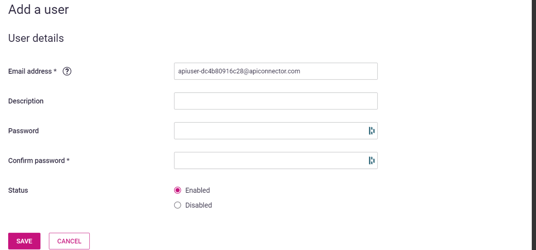
- Copy Email Address → add this into API Username field in TickX IQ
- Enter API Password
- Whilst following the above steps you will need to create & confirm a password
- The password you create in Dotdigital → add this into API Password field in TickX IQ
- Whilst following the above steps you will need to create & confirm a password
- Select API Region Key
- Go to Access > API Users
- See your API region - example is R2

- Select your API Region Key to match the information within Dotdigital
- Set Customer Subscription Status
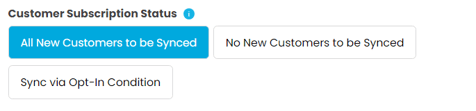
- Transactional data & new customers will be added into Dotdigital once Audience Sync is switched on. This field will determine whether or not new contacts do get added to Dotdigital.
- Set Dotdigital Audience to Active > Save
- Your Dotdigital Audiences is now set-up. Transactional data and contacts will now be added into Dotdigital automatically based on your subscription setting. All TickX IQ toggled audiences will now appear and update as lists within Dotdigital.
- Audience syncs into Dotdigital every 7 hours.